Baby Balloons pop
- 4.4
- Rating
- 10.00M
- Installs
- Free
- Price

 Analysis by App-foxy
When I first tried Baby Balloons pop, I immediately understood its appeal: it turns a very simple action into a gentle activity for young children. The idea is easy to grasp, the screen is inviting, and there is no complicated rulebook standing between a child and the first tap. AppQuiz presents it as an educational game for kids, but I found that its strongest quality is the way it creates a calm bridge between free play and early learning.
This is not the kind of game I would choose for a child looking for a long adventure, a story with characters, or increasingly complex challenges. It is better understood as a collection of short sensory activities built around popping balloons and bubbles. That narrow focus is also its advantage: a child can begin playing with very little help, stop after a few minutes, and return later without having to remember a complicated progression system.
The game is free to download, carries an Everyone age rating, and comes from AppQuiz, a developer focused here on accessible children’s play. It has reached over ten million installs and holds an average rating of 4.4 from around forty-eight thousand ratings, which suggests that its straightforward format has found a substantial audience. I would still judge it by the child in front of me rather than by popularity alone, because the simplicity that helps a toddler can feel repetitive to an older child.
You May Also Like

 Blood Strike: 2.5 Anniversary
Blood Strike’s Loadouts Turn Every Drop Into a Tactical Gamble
A close look at Blood Strike’s custom loadouts: how fast access to signature weapons reshapes its battle royale rhythm, rewards preparation, and narrows the gap between fights.

 Pandora - Music & Podcasts
Pandora’s Music Is Easy to Start, but Harder to Recover
Pandora’s strength is its low-effort path from a seed to a station. Its weak spot is how much confidence it asks you to place in connection, setup, and quiet recovery.

 8 Ball Pool
 Is Built on Rivalries, Rematches, and Routine
A close look at the rivalries, rematches, shared routines, and unanswered safety questions that turn a quick pool match into a persistent mobile community.

 Samsung Music
’s Quiet Strength Is Playing What You Already Own
Its reach comes less from spectacle than from dependable access to a personal library. That simplicity is both the app’s strongest retention engine and its ceiling.

 AccuWeather: Weather Radar
AccuWeather Review: A Quick, Clear Forecast for Everyday Decisions
For everyday plans, the best forecast is the one you can understand quickly. AccuWeather makes rain timing, radar, and local conditions easy to act on, with a few trade-offs.

 Hill Climb Racing
Why Hill Climb Racing Still Turns Crashes Into One More Run
A tiny car, a bumpy hill and one more upgrade: Hill Climb Racing keeps resurfacing because its simple chaos makes every near-miss feel personal.
More From Our News Desk



How the first few minutes feel
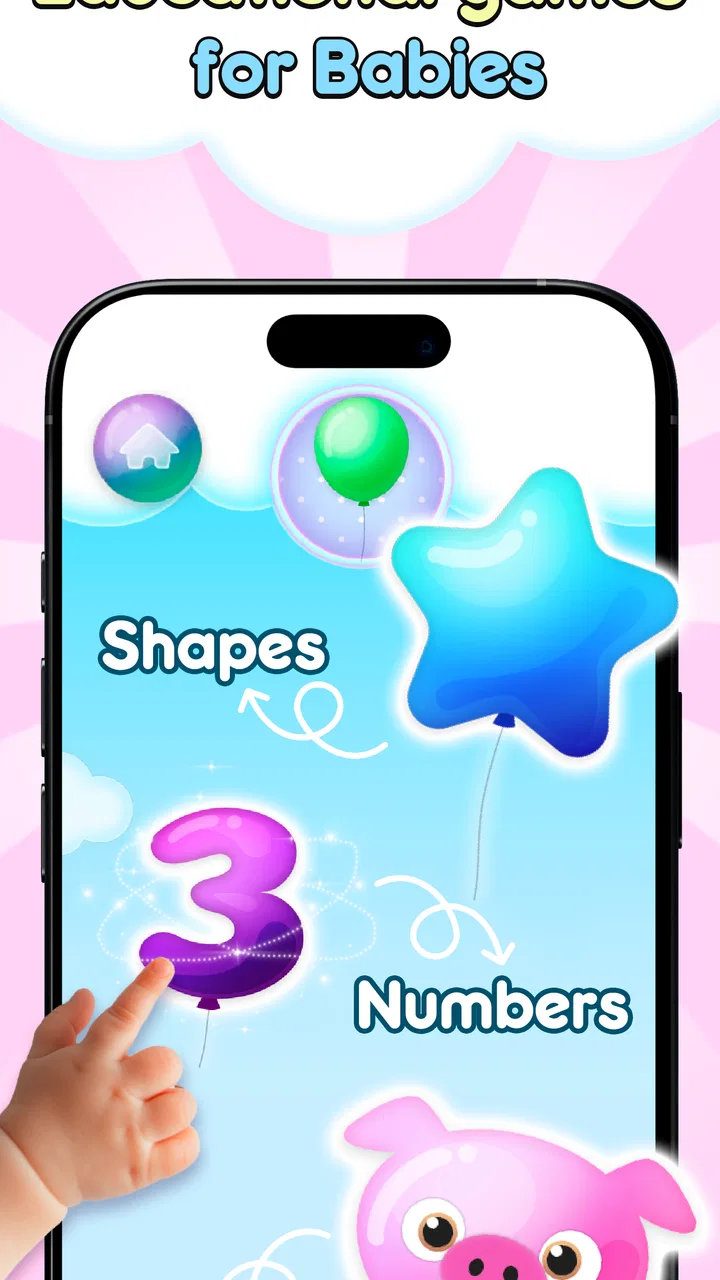
The first impression is deliberately immediate. Balloons and bubbles are familiar objects, and tapping them gives a child an obvious goal without requiring reading skills. That matters for preschool play: the child does not need to understand menus, instructions, or a fictional setting before doing something meaningful on screen. I could hand the device over and explain the central action in a single sentence.
The visual language is soft and friendly rather than busy or intense. The objects stand out clearly enough to invite attention, while the overall presentation avoids the visual pressure found in many fast arcade games. There is no need to chase a complicated interface or decode small symbols before playing. For a parent, that makes the game easier to introduce during a quiet moment, such as waiting at an appointment or settling down before a nap.
That said, I would not confuse easy access with completely independent use. A very young child may still tap outside the play area, open another screen, or lose interest when the activity changes. The game works best when an adult is nearby during the first session, not to teach a difficult system, but to help the child understand where to touch and when to move on.
One useful way to approach it is as a short shared activity rather than an electronic babysitter. I found that a child can enjoy a few rounds while an adult names the colors, describes what is moving, or asks the child to point before tapping. This turns the screen into a prompt for conversation. Without that interaction, the educational value can become much thinner, because repeated tapping alone does not automatically create learning.
A visual world built from familiar shapes
The setting is intentionally light. Instead of asking the player to learn a large fictional world, the game uses recognizable visual elements that a young child can understand at once. Balloons suggest celebration and play, while bubbles suggest movement and surprise. That choice gives the game a coherent mood without adding story details that would distract from the central action.
I appreciate that the art direction supports the mechanics rather than competing with them. In a more elaborate children’s game, animated characters, decorative backgrounds, and collectible objects can all fight for attention. Here, the main objects remain the reason to look at the screen. The presentation feels designed around noticing, reaching, and reacting, which is exactly what the basic activity needs.
There is also a practical benefit to this restrained visual approach. A child who is still developing hand-eye coordination can focus on one moving target at a time instead of sorting through several layers of information. If you are using the game with a child who becomes overwhelmed by crowded screens, its uncluttered concept may be more comfortable than a typical educational suite packed with menus and rewards.
My main reservation is that the same visual simplicity can limit long-term engagement. Balloons and bubbles are effective immediately, but they do not provide the imaginative depth of a drawing app, a storybook, or a construction game. I would use this as one activity in a child’s rotation, not as the only digital experience. Its world is coherent because it stays small, but that smallness eventually becomes noticeable.
What the art teaches without turning into a lesson
The game’s educational character comes less from formal instruction and more from the physical relationship between the child and the screen. A child watches an object appear or move, chooses a moment to touch it, and sees an immediate response. That loop can support attention, visual tracking, and basic coordination. I would describe these as early-play benefits rather than measurable lessons, but they are still useful when the activity is kept short.
Parents can make the visual design work harder by adding their own prompts. Before the child taps, I might ask, “Where is the blue one?” or “Can you find the biggest bubble?” I would not expect the app itself to replace a structured lesson. Instead, I see it as a responsive surface that gives adults something concrete to talk about with a child.
A small but important trade-off appears here: the less text and explanation a game uses, the more it depends on the adult’s guidance if the goal is learning. That is not a flaw for a sensory game, but it changes how I evaluate it. If you want phonics, counting practice, or guided vocabulary, a dedicated preschool curriculum app will probably be a better fit. If you want a low-pressure way to encourage noticing and tapping, this format makes more sense.
Sound, rhythm, and the feeling of play
Sound is important in a game built around small actions. Each successful tap needs to feel complete, and audio feedback can help a child understand that the touch produced a result. The overall mood is playful and gentle rather than competitive. I found that this supports short sessions, especially when a child is tired or needs a calm distraction instead of a loud, demanding game.
The rhythm comes from repetition: notice an object, reach for it, tap, and watch the response. That repeated cycle is easy for a young player to follow. It also gives the game a predictable structure, which can be reassuring for children who prefer knowing what will happen next. At the same time, predictable rhythm means the experience does not create much suspense for older children.
I would pay attention to the device’s volume before handing it to a child. Even a pleasant sound effect can become irritating when an action is repeated many times, particularly in a quiet room or during a journey. Headphones are not always a good solution for very young children, so I prefer keeping the volume low and playing alongside them. The game’s gentle mood works best when the surrounding environment remains comfortable too.
The audio-visual relationship is most successful when it confirms rather than overwhelms. A balloon or bubble should remain the star, with the sound acting as a small acknowledgment of the child’s action. That balance helps the game feel responsive without turning every tap into a dramatic event. It is a modest design choice, but for preschool play, moderation can be more useful than spectacle.
Using rhythm in an everyday routine
A realistic use case is a short waiting period when a child needs something to do but is not ready for a demanding game. I could see using it during a restaurant wait, on a quiet car journey while the device is safely handled by an adult, or during a brief transition between activities at home. I would set a clear stopping point before starting, because an activity built on repeated popping can encourage “just one more” even when the child has stopped gaining much from it.
Another useful routine is shared turn-taking. One person can point while the child taps, then the child can choose the next target. This reduces aimless repetition and adds language, patience, and simple social interaction. It also gives an adult a chance to notice whether the child is struggling with the touch controls, losing interest, or becoming overstimulated.
I would avoid using it immediately before bedtime if the child becomes excited by screen play. The game’s mood is calmer than that of a competitive action title, but calm visuals do not make every screen session relaxing for every child. The right time depends on the child’s response, not just on the game’s cheerful presentation.
How the mechanics fit the audience
The core mechanic is a strong match for beginners because it asks for one clear gesture. There is no need to memorize combinations or understand a complex objective. That makes it suitable for children who are still learning how a touchscreen responds to a finger. The immediate feedback also helps them connect intention and result: I touched this object, and something happened.
From a design perspective, the simplicity removes several common sources of frustration. A child is less likely to fail because they forgot a rule or selected the wrong menu. The challenge is mainly visual and physical: seeing the target, reaching it, and timing the tap. For a first sensory game, that is a sensible level of demand.
However, the same design means the game may not provide enough progression for children who already handle touchscreens confidently. If a child wants missions, puzzles, characters, unlockable areas, or a clear sense of advancement, I would recommend looking at a more structured educational game instead. This one is strongest when the goal is engagement through repetition, not mastery through increasingly difficult tasks.
There is also a distinction between educational branding and educational depth. Popping objects can support coordination and attention, but the mechanic alone does not teach a broad subject. I would not select it as the main tool for early mathematics, reading, or science. Its educational role is closer to guided sensory play, and that is a perfectly valid purpose when expectations are realistic.
Practical choices for parents
The game is free, which makes it easy to try without committing money at the beginning. It also includes in-app purchases ranging from $0.99 to $9.49 per item. I would review the purchase settings on the device before letting a child play alone, especially because young children can tap quickly without understanding what a confirmation screen means. The free entry point is helpful, but family supervision remains important around any optional purchase.
The current version is 23.3, and the minimum operating system is Android 7.1. That makes compatibility worth checking before installation, particularly if the game is being considered for an older spare device used by a child. On a suitable device, I would also test the touch response myself. A screen protector, a sluggish phone, or a child’s very light touch can affect the experience more than the game’s rules do.
The Everyone rating makes the game approachable for a broad family audience, but an age label should not be treated as a recommendation for unlimited play. I would still consider the child’s motor skills, attention span, and reaction to sound. A toddler who enjoys simple visual feedback may be a better match than a school-age child expecting a challenge.
One practical tip is to play the first session with the device held steady rather than flat on a table. Young children often press with more force than expected or follow moving objects with their whole hand. A stable position makes it easier to see whether the problem is the child’s timing, the screen’s responsiveness, or simply a loss of interest.
Where it stands beside familiar alternatives
Compared with a standard puzzle game, Baby Balloons pop is less demanding and more immediately accessible. It does not ask a child to sort several objects, remember patterns, or plan multiple moves ahead. That makes it a better choice for a first touch activity, but a weaker one for developing sustained problem-solving.
Compared with drawing apps, it offers less creative control. A drawing tool lets a child decide what to make and often encourages longer concentration. This game provides a clearer cause-and-effect loop, which is useful when a child needs a simple success, but it does not offer the same open-ended expression.
Compared with storybook apps, it has almost no narrative burden. That is helpful when a child cannot read yet or does not want to sit through spoken instructions. A story app will usually do more for vocabulary and listening, while this game does more for quick visual interaction. I would choose between them based on the moment: quiet shared reading for language, short popping play for sensory engagement.
Compared with larger educational collections, its advantage is focus. There are fewer systems to learn and fewer ways for a child to wander away from the intended activity. The cost is breadth. A broad learning suite can grow with a child through several subjects, whereas this game is likely to remain a small, specific tool in the family’s app folder.
My verdict on the atmosphere and the fit
What stays with me is the consistency between the game’s art, sound, setting, and pace. The familiar balloon-and-bubble theme creates a cheerful mood, the uncluttered presentation keeps attention on the target, and the repeated tapping rhythm makes the experience approachable. It does not pretend to be a full curriculum or a large adventure, and I think it works better because its modest purpose is clear.
I would recommend it to parents looking for a free, low-pressure first game for a young child who enjoys tapping, watching objects react, and repeating a simple action. It is also useful as a brief shared activity when an adult wants to add questions about colors, position, or movement. The strongest results come when the adult treats the game as a starting point for interaction rather than leaving the child with an endless stream of taps.
I would skip it for a child who quickly needs new rules, deeper puzzles, creative tools, or a strong learning curriculum. I would also look elsewhere if the main goal is reading, counting, storytelling, or a long-term progression system. The game’s limited scope is not hidden, and it should be judged as sensory play rather than as a complete educational program.
For me, the final decision comes down to expectations. If you want a gentle touchscreen activity with a clear action and a friendly mood, Baby Balloons pop is an easy game to try. If you want substantial academic practice or a game that keeps an older child challenged for weeks, another category will serve you better. Its value lies in the small moment: a child notices a colorful object, reaches for it, and enjoys seeing the screen respond.
That makes it simple, but not pointless. Used in short sessions, with sensible volume and purchase supervision, it can fit naturally into early play. I would keep it alongside books, drawing, physical toys, and conversation, not in place of them. In that setting, the game’s compact design becomes its most honest strength: an approachable sensory activity that respects a young child’s need for immediate, understandable feedback.
FAQs for Baby Balloons pop
01What is Baby Balloons Pop and how does it work?
Baby Balloons Pop is an engaging and colorful mobile game designed for young children. The primary objective is to pop vibrant balloons on the screen to score points. The intuitive interface and simple tap controls make it easy for kids to play and improve their motor skills while having fun.
02Is Baby Balloons Pop safe for young children to play?
Yes, Baby Balloons Pop is specifically designed with young children in mind. The app contains no third-party ads, in-app purchases, or inappropriate content. Parents can rest assured that the game provides a safe and secure environment for their children to enjoy and learn.
03Does Baby Balloons Pop require an internet connection to play?
No, Baby Balloons Pop does not require an internet connection to play. This makes it an ideal game for on-the-go entertainment, allowing children to enjoy popping balloons without the need for Wi-Fi or mobile data.
04What are the educational benefits of playing Baby Balloons Pop?
Playing Baby Balloons Pop can help enhance a child's hand-eye coordination, reaction time, and fine motor skills. The game also encourages pattern recognition and color identification, providing a fun and interactive way for children to develop essential cognitive skills.
05Can Baby Balloons Pop be customized to suit different age groups?
Yes, Baby Balloons Pop offers adjustable difficulty levels to cater to different age groups and skill levels. Parents can select the appropriate settings to ensure the game remains challenging yet enjoyable for their child, making it a versatile choice for various developmental stages.
Pros
- Engaging colors and sounds for toddlers.
- Simple interface
- easy for kids to use.
- Improves hand-eye coordination skills.
- No in-app purchases
- safe for kids.
- Entertaining for long car rides.
Cons
- Limited levels can become repetitive.
- No parental control settings available.
- Ads may disrupt the gameplay.
- Requires internet for some features.
- Lacks educational content depth.

Baby Balloons pop
Gallery